In my previous post, I showed how to route Xcode 26.3 coding agent through OpenRouter to reach Claude models on Amazon Bedrock. That works well for personal projects and quick demos, but it has one obvious limitation: your code, your prompts, and your AI-generated suggestions all transit through OpenRouter’s servers on their way to Bedrock and back.
For many of us working on proprietary codebases, that is a non-starter. Customers who want to keep their data within the security perimeter of their own AWS account cannot use a third-party proxy, no matter how convenient it is. The data has to stay on a path you control, end to end.
So let me walk you through two solutions that keep everything inside your AWS account.
Option 1: Direct Integration with Bedrock Mantle
The most straightforward path is to skip the proxy entirely. Amazon Bedrock now offers Mantle, a distributed inference engine that exposes an OpenAI-compatible API endpoint directly. You point your OpenAI SDK, or in our case Xcode, at the Mantle endpoint and it just works. No format translation, no intermediary.
The Mantle endpoint follows a simple pattern: https://bedrock-mantle.<region>.api.aws/v1. You authenticate with a Bedrock API key, the same kind you would create for any Bedrock integration.
To configure Xcode, open Settings, navigate to AI, then Chat Model Configuration. Set the server URL to your regional Mantle endpoint, for example https://bedrock-mantle.us-east-1.api.aws/v1. Paste your Bedrock API key in the API key field. Then open the model picker to browse the available models.
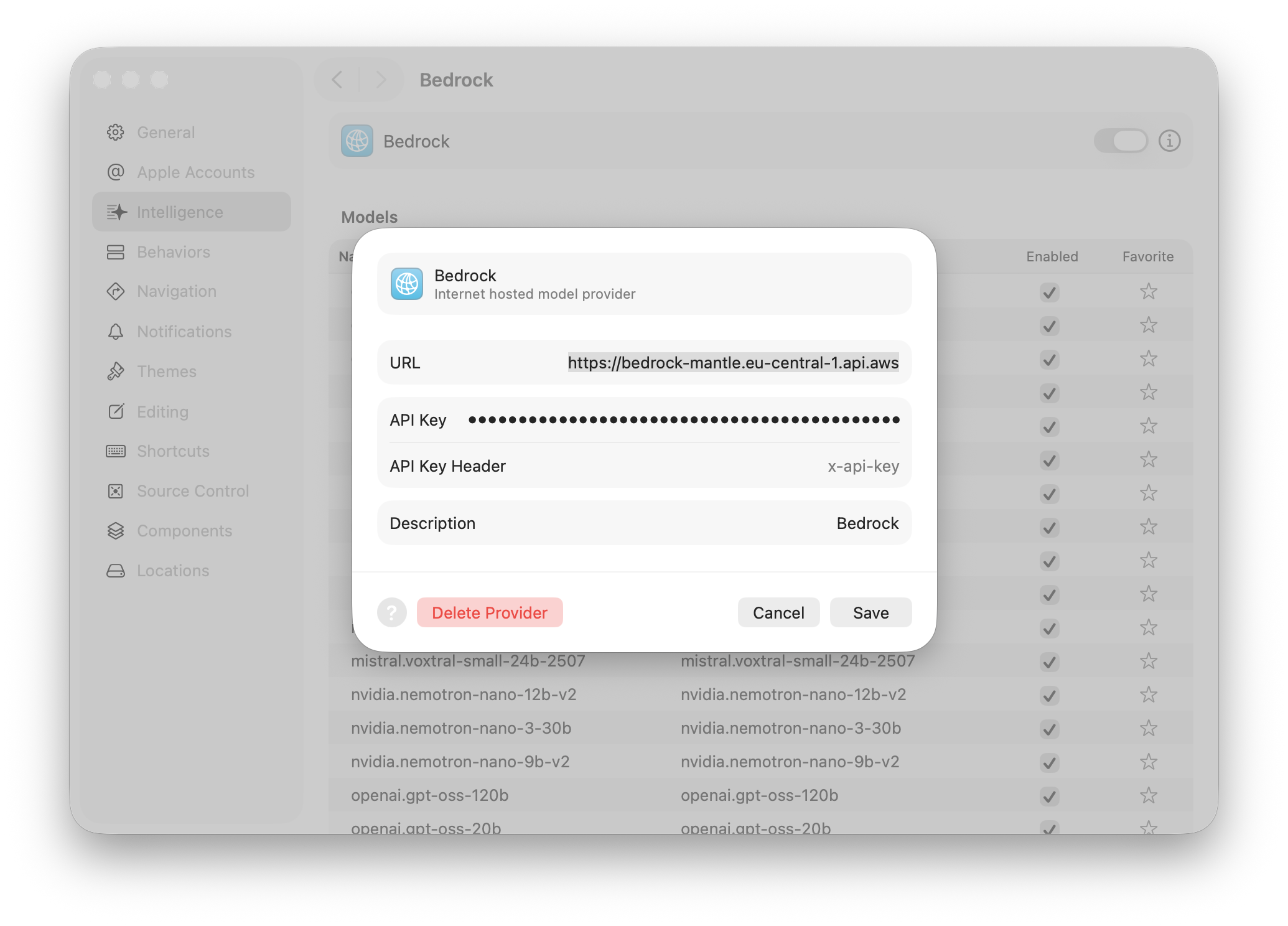
And this is where you hit the limitation. The model list that comes back from Mantle includes models from Mistral, Google Gemma, NVIDIA, Qwen, and others, but no Anthropic Claude. At the time of writing, Claude models are not available through the Mantle endpoint.
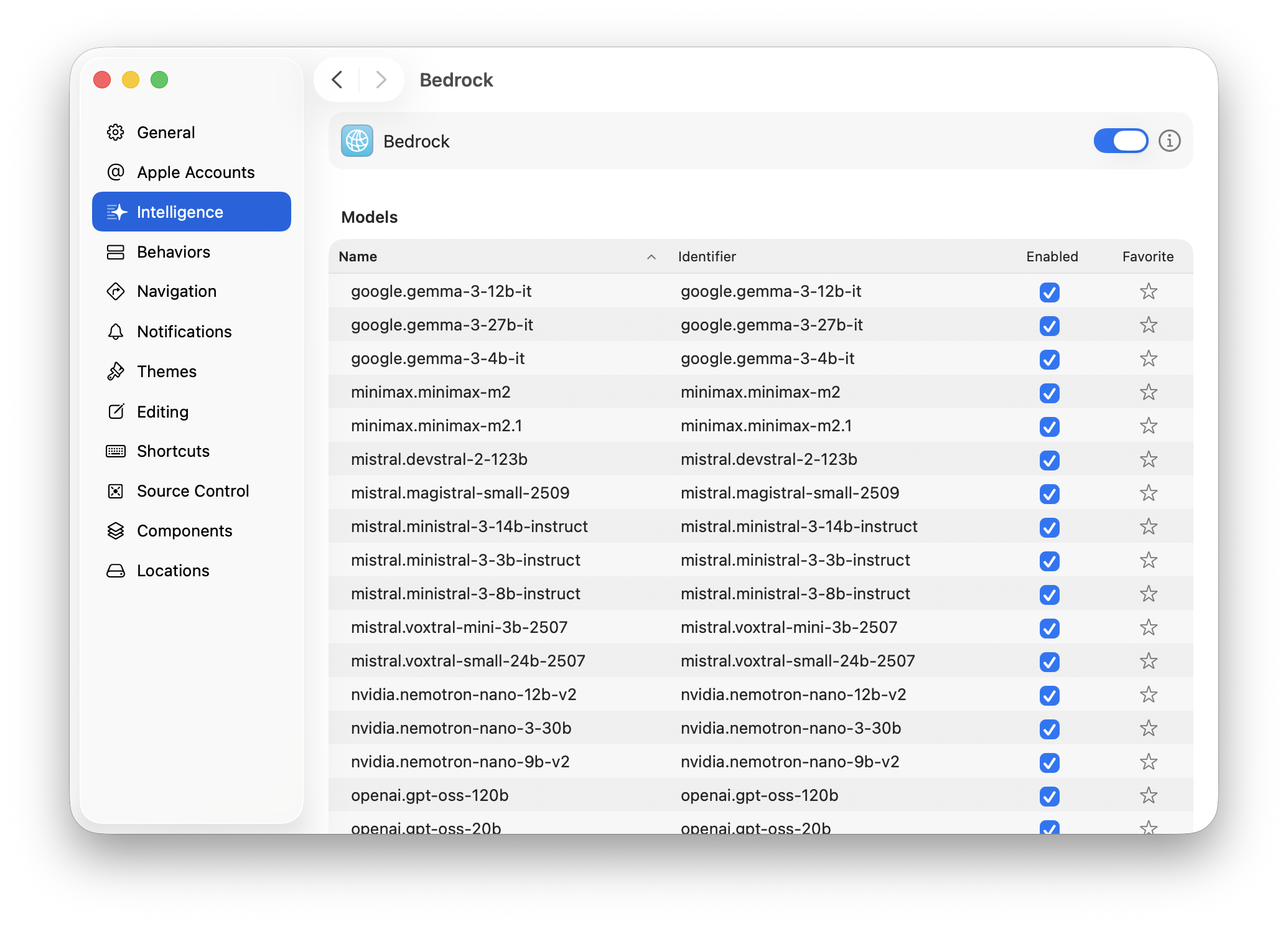
If those models work for you, Mantle is the simplest solution and I would stop here. But if you want to use Claude through Bedrock, and that is probably why you are reading this, you need a different approach.
Option 2: A Self-Hosted Proxy
To use Anthropic’s Claude models on Bedrock with Xcode, we still need a proxy. The reason is simple: Xcode speaks the OpenAI Chat Completions API, but Bedrock exposes Anthropic’s own API format for Claude models. The request structure, the message format, the streaming protocol, everything is different. Someone has to sit in the middle and translate.
I wrote a lightweight proxy in Swift that does exactly this. It is available on GitHub at github.com/sebsto/anthropic-proxy. You run it on your own machine or server, and it gives you full visibility and control over every request flowing between Xcode and Bedrock.
How It Works
The proxy sits between Xcode and Bedrock. It accepts OpenAI Chat Completions requests from Xcode, translates them into Bedrock’s Anthropic format, signs the request with your AWS credentials using SigV4, sends it to Bedrock, and translates the response back into the OpenAI format that Xcode expects.
Xcode  ──OpenAI format──>  Proxy  ──Bedrock format (SigV4)──>  Amazon Bedrock (Claude)
       <──SSE stream──────         <──EventStream binary──────
The proxy handles four things. First, it translates requests by converting OpenAI message arrays, system prompts, tool definitions, and all the other fields into the Anthropic format that Bedrock expects. Second, it translates responses in the other direction, converting Anthropic’s JSON back to OpenAI’s format. For streaming, this means parsing Bedrock’s binary EventStream frames and emitting OpenAI-style Server-Sent Events. Third, it provides model discovery by calling Bedrock’s ListFoundationModels API and presenting the results in OpenAI’s model list format, so Xcode’s model picker works. Fourth, it handles AWS authentication by signing every outbound request with SigV4 using your local AWS credentials.
The whole thing is written in Swift 6 with strict concurrency, built on Hummingbird for the HTTP server and soto-core for AWS credential resolution and signing. It compiles and runs on both macOS and Linux.
Getting It Running
You need Swift 6.0 or later (coming with Xcode 26.x) and valid AWS credentials. If you already have the AWS CLI configured with SSO or static credentials, the proxy picks those up automatically through the standard credential chain.
First, clone the repository and build it.
git clone https://github.com/sebsto/anthropic-proxy.git
cd anthropic-proxy
swift build
Then run the proxy. The PROXY_API_KEY is a key you choose yourself. It protects the proxy endpoint so that only authorized clients can use it.
PROXY_API_KEY=my-secret-key swift run App
The proxy is now listening on http://127.0.0.1:8080.
If you use AWS SSO, you can pass your profile name directly.
aws sso login --profile my-profile
swift run App --aws-profile my-profile

The proxy verifies that your AWS credentials are valid at startup. If it cannot resolve credentials, it tells you exactly what went wrong and exits immediately rather than starting a server that would fail on every request.
Configuring Xcode
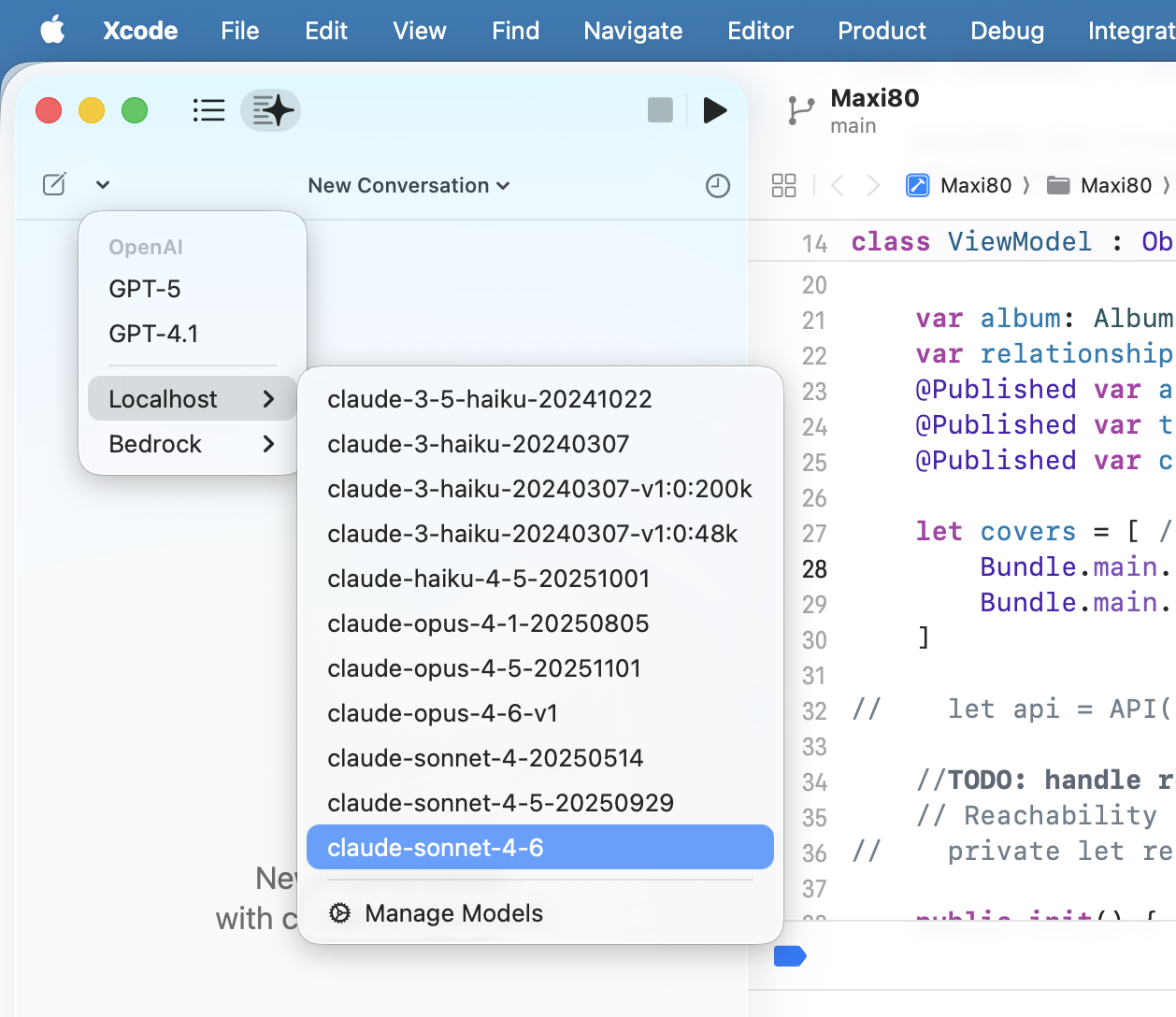
Open Xcode Settings, go to AI, then Chat Model Configuration. Set the server URL to http://127.0.0.1:8080/v1. Enter your PROXY_API_KEY value as the API key and x-api-key as authorization header. Click on the model picker and you should see the Claude models that are enabled in your Bedrock account.
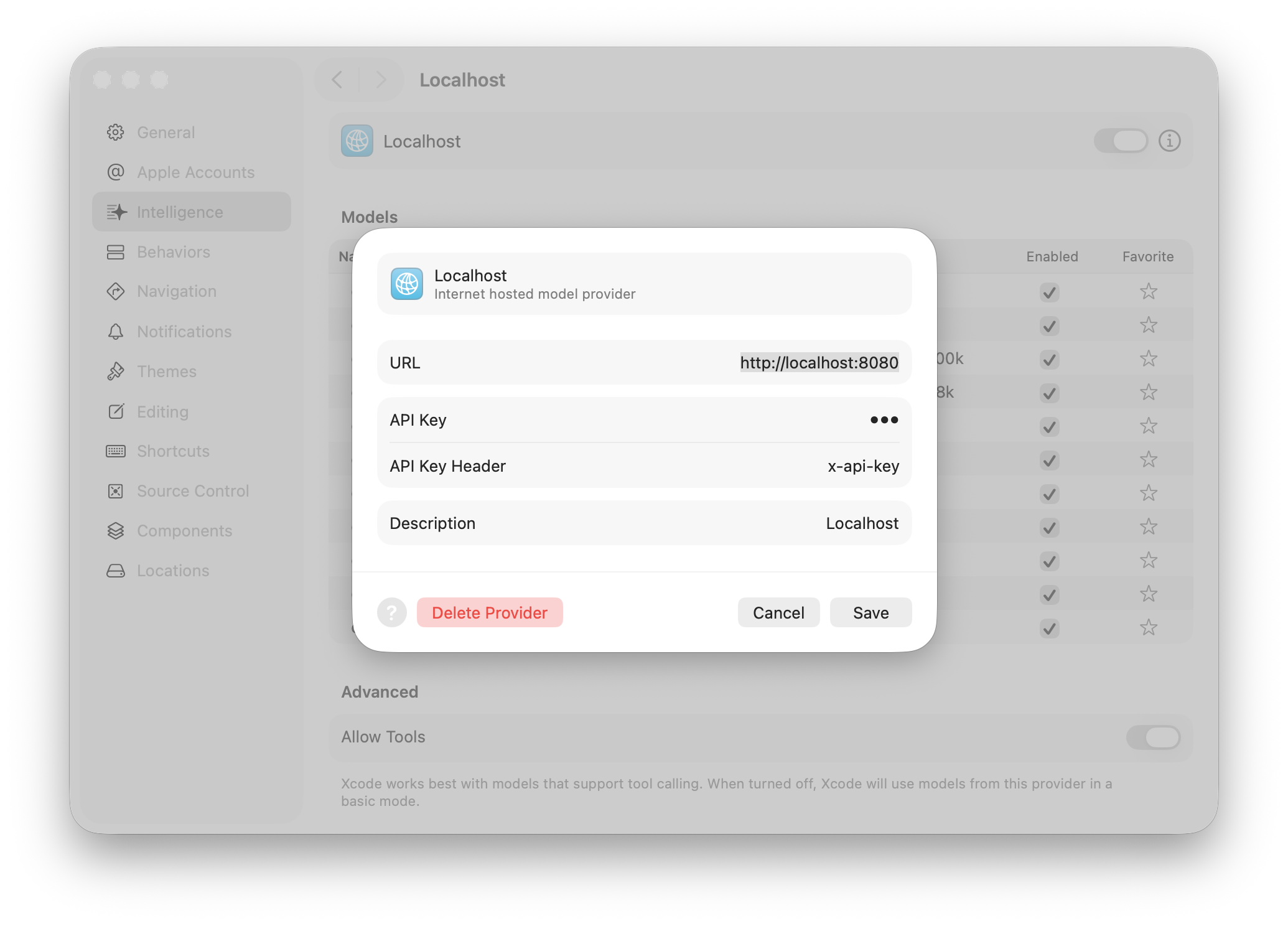
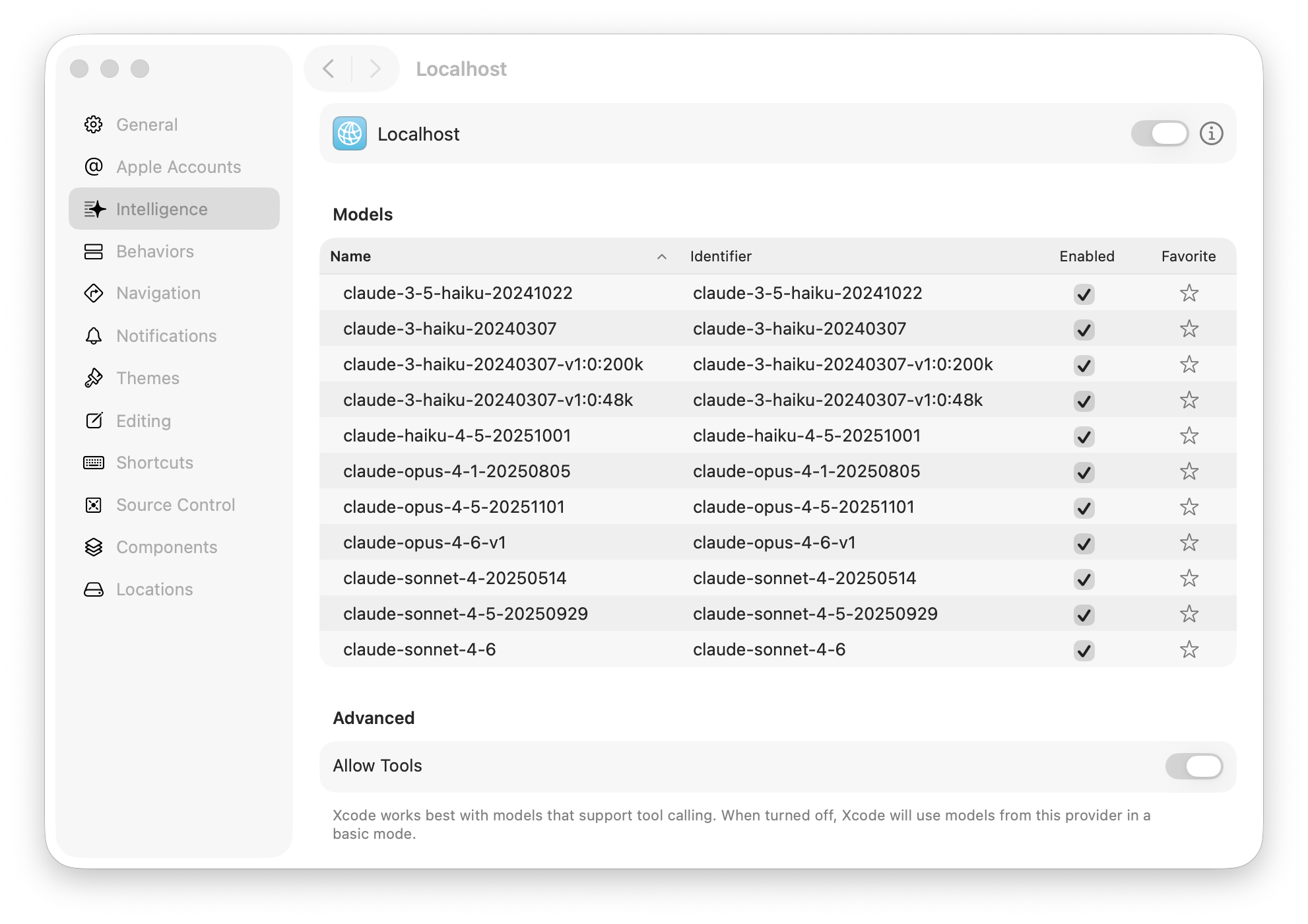
Select a model and start a conversation. The coding agent works exactly as it would with any other backend. Streaming responses appear token by token, tool calls work, and the whole experience is indistinguishable from using Claude directly.
Running in a Container
If you want to run the proxy on a shared machine for your team, or deploy it on a server, it ships with a Containerfile (similar to Dockerfile, but for Apple Container command) that builds a Linux image.
container build --tag anthropic-proxy -f ./Containerfile

eval $(aws configure export-credentials --profile work --format env)
container run \
  -p 8080:8080 \
  -e AWS_ACCESS_KEY_ID \
  -e AWS_SECRET_ACCESS_KEY \
  -e AWS_SESSION_TOKEN \
  -e AWS_REGION=us-east-1 \
  -e PROXY_API_KEY=my-secret-key \
  anthropic-proxy --hostname 0.0.0.0
The eval line exports your current AWS session credentials as environment variables, which are then passed into the container. The --hostname 0.0.0.0 flag is important when running in a container, otherwise the server binds to the container’s loopback address and is unreachable from the host.
Under the Hood
For those curious about the internals, the design document goes into detail about the translation rules, the EventStream binary frame parsing, and the streaming pipeline.
The trickiest part of the proxy is streaming. Bedrock returns responses in the AWS EventStream binary protocol, a compact binary framing format with CRC checksums and headers. Each frame carries a JSON payload containing a base64-encoded Anthropic streaming event like message_start, content_block_delta, or message_delta. The proxy decodes these binary frames on the fly, extracts the Anthropic event, translates it into an OpenAI SSE chunk, and streams it to Xcode incrementally without waiting for the full response.
The proxy also emits heartbeat comments in the SSE stream while waiting for Bedrock to start generating. Bedrock can take a few seconds before the first token arrives, and without these keep-alive signals, Xcode might time out and close the connection.
Which Option Should You Choose?
If the models available through Mantle work for you and you want zero infrastructure to manage, go with Bedrock Mantle. Point Xcode at the endpoint and you are done.
If you want to use Claude models on Bedrock or need your data to stay entirely within your AWS account, run the self-hosted proxy. It takes a few minutes to set up and gives you full control over the data path.
Both approaches avoid sending your code through third-party services. Your prompts go from your machine to your AWS account and back, using your own credentials and your own billing.
Wrapping Up
Between Bedrock Mantle and the self-hosted proxy for Claude, you have two solid options for using Xcode’s coding agent with Amazon Bedrock while keeping your data where it belongs. The proxy is open source and I welcome contributions. If you run into issues or have suggestions, open an issue on the GitHub repository or find me on Bluesky or LinkedIn.